


How to Remove Private Number on Android: Getting calls from private numbers can be really frustrating. You see “Private Number” or “Unknown” flashing on your screen, and you’re left wondering who’s calling. Is it important? Is it a scam? Should you even pick?
If you’re tired of these mystery calls interrupting your day, you’re in the right place. This guide will show you exactly how to remove private number restrictions on Android and deal with hidden callers once and for all.
Understanding Private Numbers and How They Work
Before we jump into solutions, let’s understand what we’re dealing with here.
A private number is simply a call where the caller has hidden their phone number from appearing on your screen. Instead of seeing digits like 0803XXXXXXX, you see “Private Number,” “Unknown,” or “No Caller ID.”
People hide their numbers for different reasons. Some do it for privacy. Others might be calling from offices that automatically block caller ID. Banks sometimes call with private numbers. Unfortunately, scammers also love using this feature.
The thing is, when someone calls you with a private number, they’ve activated a setting on their end that blocks their number from being transmitted to your phone. This happens before the call even reaches you.
So technically, you can’t “remove” the private number block yourself because the restriction is coming from the caller’s side, not yours. But don’t worry. There are still several things you can do to deal with these calls and even reveal who’s calling in some cases.
Why You Keep Getting Private Number Calls in Nigeria
Private number calls are pretty common in Nigeria. Here’s why you might be receiving them:
Marketing and sales calls. Many businesses and telemarketing companies hide their numbers when making promotional calls. They know people are less likely to block them if they can’t identify the number.
Bank security calls. Your bank might call you from a private number to verify transactions or discuss account issues. This is supposed to be for security reasons, but it makes it hard to know if it’s really your bank calling.
Collection agencies. If you have outstanding debts or loans, collection agents often use private numbers to reach you. They do this because people tend to avoid calls from numbers they recognize as debt collectors.
Scammers and fraudsters. Unfortunately, this is a big one in Nigeria. Scammers hide their numbers to avoid being traced and reported. They might pretend to be family members in trouble or claim you’ve won something.
Wrong numbers and pranks. Some people just like causing trouble. They’ll hide their number and make prank calls or harass people.
Network issues can also sometimes cause a number to display as private even when the caller didn’t intend to hide it.
Method 1: Block All Private Numbers on Your Android Phone
The simplest solution is to just block all private number calls. Your phone won’t ring, and you won’t be disturbed.
Most Android phones have a built-in feature for this, though the exact steps vary depending on your phone brand.
For Samsung Phones
Samsung makes it pretty easy to block unknown callers.
Open your Phone app. That’s the green icon you use to make calls.
Tap the three dots in the top right corner. You’ll see a menu pop up.
Select “Settings” from the menu.
Look for “Block numbers” and tap it.
You’ll see an option that says “Block unknown callers” or “Block anonymous calls.” Turn on the toggle switch next to it.
That’s it. From now on, calls from private numbers will be automatically rejected. They’ll go straight to voicemail if you have that set up.
For Other Android Phones
If you’re using a different Android brand like Infinix, Tecno, Itel, or Xiaomi, the steps are similar but might be in slightly different places.
Open the Phone app.
Tap the three-dot menu icon (usually at the top right).
Go to Settings.
Look for options like “Blocked numbers,” “Call blocking,” or “Call settings.”
Find the option to block unknown or private callers and turn it on.
Some phones call it “Filter spam calls” or “Block anonymous callers.” The name might be different, but the function is the same.
Using the Google Phone App
If your phone came with the Google Phone app or you downloaded it from the Play Store, blocking private numbers is straightforward.
Open the Phone app by Google.
Tap your profile picture or the three lines at the top left.
Go to Settings.
Tap on “Blocked numbers.”
Turn on “Unknown” to block all calls from numbers not in your contacts or call history.
Google’s Phone app also has spam protection that can filter out suspected spam calls automatically.
Method 2: Use Your Network Provider’s Services
Nigerian mobile networks offer services that can help you deal with private number calls.
MTN True Caller Service
MTN has a partnership with Truecaller that lets you identify unknown numbers. While this doesn’t work perfectly with completely blocked private numbers, it can help with some calls that appear as unknown.
To activate, dial *123# and follow the menu options to subscribe to caller identification services.
Airtel and Glo Options
Both Airtel and Glo have caller tune and identification services, though they’re not specifically designed for private numbers.
Your best bet with any network is to contact customer service and ask about call screening or blocking services. Dial 121 for Airtel or 121 for Glo customer care.
9mobile Services
9mobile (formerly Etisol) also offers call management features. Dial 200 to reach customer care and inquire about blocking private or unknown callers.
Keep in mind that some of these services might come with subscription fees. Make sure to ask about costs before activating anything.
Method 3: Install Third-Party Call-Blocking Apps
If your phone’s built-in features aren’t enough, there are apps specifically designed to handle unwanted calls.
Truecaller
This is probably the most popular caller ID app in Nigeria. Almost everyone knows about Truecaller.
Download it from the Play Store (it’s free, though there’s a paid version with more features).
After installation, give it the necessary permissions to access your calls and contacts.
Truecaller has a database of millions of numbers. When someone calls you, even with a private number, the app will try to identify them if they’re in the database.
You can also block all private numbers through Truecaller’s settings. Just go to Settings > Block > Block private numbers.
The app also identifies spam callers and can automatically block them. Many Nigerians have reported spam numbers, so there’s a good chance scam calls will be flagged.
Should I Answer?
This app is less known in Nigeria, but it’s quite effective.
It works similarly to Truecaller but focuses more on spam detection and community reporting.
Download from the Play Store and set it up with the required permissions.
You can configure it to automatically reject calls from private numbers or just warn you before you pick.
Call Blocker Free
As the name suggests, this is a free app dedicated to blocking unwanted calls.
It’s simpler than Truecaller and uses less battery and data.
You can create custom blocking rules, including blocking all unknown and private numbers.
The interface is straightforward. Just enable “Block private numbers” in the settings.
Things to Remember About Third-Party Apps
These apps need access to your call logs and contacts to work properly. This raises privacy concerns for some people.
They also run in the background, which can use up battery and data. If you’re on a tight data budget, monitor how much data they’re consuming.
Some features require paid subscriptions. The free versions usually have ads or limited functionality.
LEARN & EARN WITH STEEZETECHMethod 4: Contact Your Carrier to Enable Anonymous Call Rejection
This is an old-school method that many people don’t know about.
Most mobile networks have a feature called Anonymous Call Rejection (ACR). When you activate it, any call that comes in without caller ID information gets automatically rejected.
The feature is usually free, though some carriers might charge a small activation fee.
To activate ACR on most Nigerian networks:
For MTN: Dial *3511# to turn it on. Dial *3510# to turn it off.
For Airtel: Contact customer service at 121 and request Anonymous Call Rejection activation.
For Glo: Dial 121 and speak to a customer care representative about ACR.
For 9mobile: Dial 200 and ask customer service to help you activate the feature.
The exact codes might change, so if these don’t work, just call your network’s customer service. They’ll guide you through the process.
One advantage of using your carrier’s service is that it doesn’t require any app installation or drain your battery. The blocking happens at the network level before the call even reaches your phone.
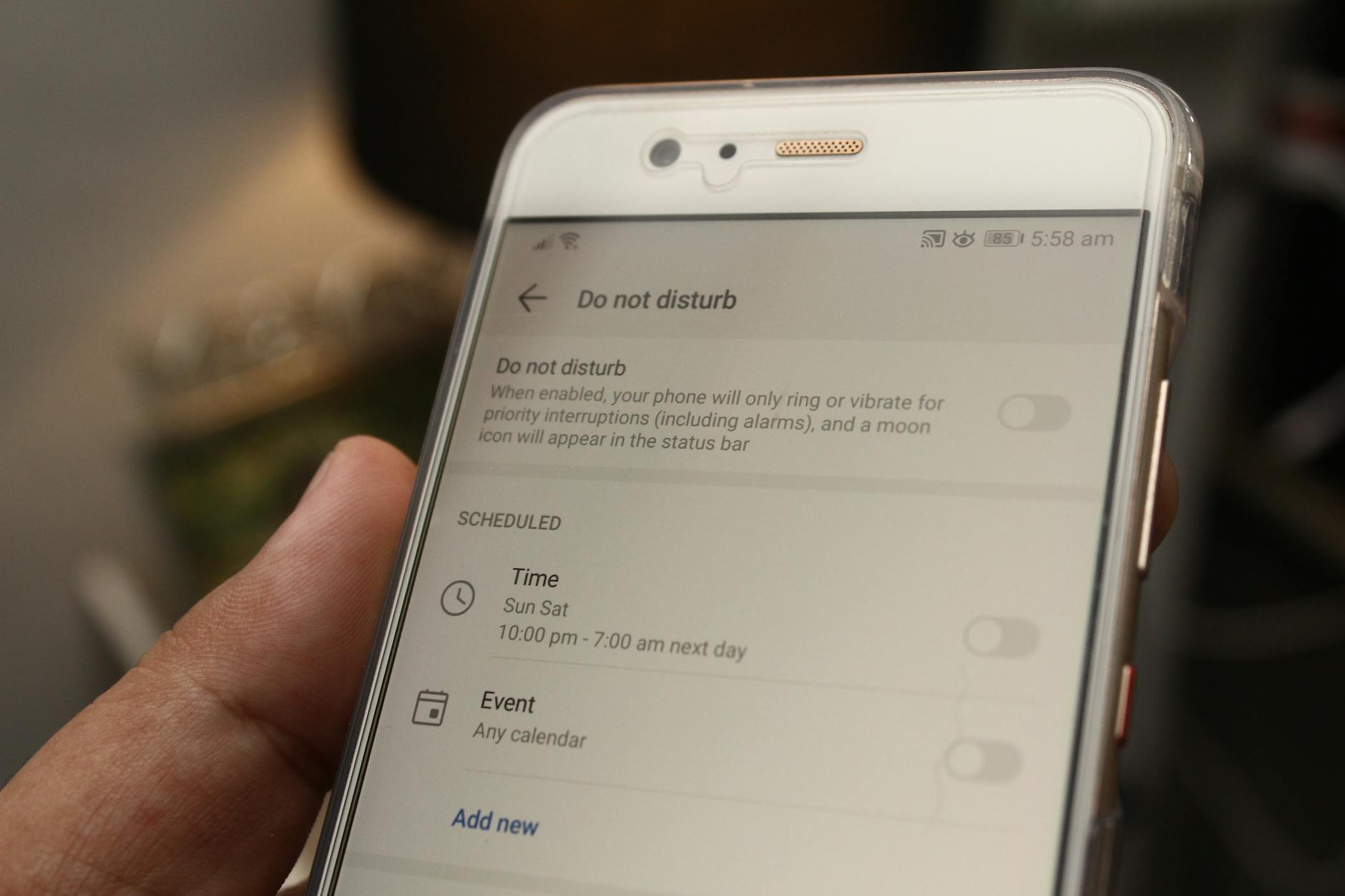
Method 5: Use Do Not Disturb Mode Strategically
Android’s Do Not Disturb (DND) mode can be customized to block calls from unknown numbers while still allowing calls from your contacts.
Here’s how to set it up:
- Go to your phone’s Settings.
- Look for “Sound” or “Sound & vibration.”
- Find “Do Not Disturb” and tap it.
- You can create exceptions for who can call you. Select “Calls” under exceptions.
- Choose “Contacts only” or “Starred contacts only.”
Now, when DND is active, only people in your contacts list can reach you. Everyone else, including private numbers, will be silenced.
You can schedule DND to turn on automatically during certain hours. This is perfect if you want undisturbed sleep but don’t want to miss important calls.
The downside? You might miss important calls from new numbers that aren’t saved in your contacts yet. Use this method carefully.
Method 6: Try to Unmask the Private Number
Sometimes you really need to know who’s calling. Maybe you’re expecting an important call, but don’t recognize the number because it’s private.
There are a few ways to try to reveal the caller’s identity.
Use Reverse Lookup Services
Some websites and apps claim they can unmask private numbers. To be honest, most of them don’t work reliably in Nigeria.
However, if the caller has contacted you before from a non-private number, reverse lookup tools might help you match calling patterns or times.
Request Call History from Your Network
This is more involved, but it works. Your mobile network keeps records of all calls made to your number, including the actual numbers of private callers.
You can request this information from your carrier’s customer service. You’ll likely need to visit a customer care center with proper identification.
This is usually only practical if you’re dealing with harassment or threats and might need the information for legal purposes.
Networks won’t just hand over this information easily. They have privacy policies to protect callers, too. But if you have a legitimate security concern, they might cooperate, especially if law enforcement is involved.
Let Unknown Callers Leave Voicemail
Set up voicemail on your phone if you haven’t already. Many private number callers will leave a message if the call is important.
To set up voicemail, contact your network provider’s customer service. Each network has different procedures.
Once set up, blocked or ignored calls will go to voicemail, and legitimate callers can identify themselves. Then you’ll know whether to call them back.
How to Identify Scam Calls from Private Numbers
Not all private number calls are bad, but many are scams. Here’s how to spot them:
The urgency tactic. Scammers often create a false sense of urgency. “Your account will be blocked in 24 hours!” or “Your relative is in police custody and needs money now!”
Requests for personal information. No legitimate organization will call and ask for your BVN, PIN, or password. Banks, especially, will never ask for this information over the phone.
Too good to be true offers. Have you won a lottery you didn’t enter? Someone wants to dash you millions of naira? It’s definitely a scam.
Poor call quality or background noise. Many scam operations run from call centers with lots of background noise. While this isn’t always a sign of a scam (some legitimate call centers are noisy too), it’s worth noting.
The callback trap. Some scammers will call and hang up immediately, hoping you’ll call back. The number they’re calling from might be a premium rate number that charges you money per minute.
Bank impersonation. Scammers often claim to be from your bank’s “security department” or “fraud prevention unit.” They’ll say there’s suspicious activity on your account and they need to “verify” your details.
If you receive a suspicious call from a private number, just hang up. Don’t engage. If they claim to be from your bank or another organization, end the call and contact that organization directly using their official phone number.
What to Do If You Need to Accept Private Number Calls
Maybe you’re in a situation where you need to accept private numbers. Perhaps you’re job hunting, and employers might call with blocked numbers. Or you’re expecting a call from a hospital or government office.
In this case, you don’t want to block all private numbers. Here’s what you can do:
Be selective about answering. If you’re not expecting a call, let it go to voicemail. Important callers will leave a message.
Ask for identification immediately. When you pick up, ask “Who is this?” and “What organization are you calling from?” right away. Legitimate callers won’t mind identifying themselves.
Don’t share information first. If they claim to be from your bank or another organization, don’t confirm any details. Instead, say you’ll call the organization back directly.
Use a secondary line. If you have a dual-SIM phone, keep one number for trusted contacts and let the other receive general calls. This way, private number calls only come to one line, and you know which calls to be cautious about.
Keep records. Note down the time and date of private number calls, especially if they’re persistent. This information can be useful if you need to report harassment.
Legal Protection Against Harassment from Private Numbers
If you’re receiving threatening or harassing calls from private numbers, you have legal options in Nigeria.
Document everything. Keep a log of when the calls happen, what was said (if you answered), and how often they occur.
Report to your network provider. They can investigate and potentially trace the calls. Visit your network’s customer care center and make a formal complaint.
File a police report. Harassment and threatening calls are illegal. The Nigerian Police Force has a cybercrime unit that handles such cases. You can report to any police station.
Contact the Nigerian Communications Commission (NCC). The NCC regulates telecommunications in Nigeria. You can file a complaint with them about persistent harassment or spam calls. Visit their website or contact them at 622 or 0809-220-0001.
Consider legal action. If the harassment is severe or affecting your life significantly, you can consult a lawyer about getting a restraining order or pursuing other legal remedies.
Remember, you have a right to privacy and peace of mind. Don’t suffer in silence if someone is using private numbers to harass you.
How to Remove Private Number: Alternative Solutions and Workarounds
Sometimes the conventional methods don’t work perfectly. Here are some additional things you can try:
Change your number as a last resort. If private number calls are overwhelming and nothing else works, getting a new number might be your best option. It’s inconvenient, but sometimes necessary.
Use a call screening service. Some phones have built-in call screening where Google Assistant can answer calls for you and transcribe what the caller says. This is available on some Android phones with Google’s Phone app.
Create a whitelist. Instead of trying to block private numbers, you could set up your phone to only ring for numbers in your contacts. Everyone else goes to voicemail. This is extreme but effective.
Forward calls to a secondary device. If you have an old phone lying around, you could forward private number calls to it. This way, they don’t disturb you on your main phone, but you can check the old phone occasionally if you’re expecting something important.
Use airplane mode during specific hours. If private number calls only come at certain times (like late at night), put your phone in airplane mode during those hours. This blocks all calls and messages, so only use it when you definitely don’t want to be disturbed.
Frequently Asked Questions (FAQs)
Can I permanently remove private numbers from calling me?
You can’t stop people from calling with private numbers completely, but you can block these calls on your end. Use your phone’s built-in blocking feature or install apps like Truecaller to automatically reject private number calls. Your mobile network can also activate Anonymous Call Rejection for you.
How do I find out who called me from a private number?
Unfortunately, there’s no easy way to reveal a private number after the call. The caller has blocked their ID from your end. However, you can request call records from your mobile network provider, though they typically only provide this for legal or security issues. Letting calls go to voicemail is often the best way to identify legitimate callers.
Why do banks in Nigeria call with private numbers?
Many Nigerian banks use private numbers for security calls to prevent their official numbers from being cloned or spoofed by scammers. However, this creates confusion because scammers also use private numbers. Always verify bank calls by hanging up and calling your bank’s official customer service line directly.
Does blocking private numbers affect WhatsApp calls?
No. Blocking private numbers on your phone only affects regular cellular calls. WhatsApp calls come through the internet and show the person’s WhatsApp profile, so they’re not affected by private number blocking settings.
Are private number calls always scams?
Not at all. While many scam calls do come from private numbers, legitimate organizations also use them. Hospitals, government offices, some businesses, and international callers might show up as private numbers. That’s why it’s better to screen calls rather than automatically assume they’re all scams.
Can police trace private number calls in Nigeria?
Yes, law enforcement can trace private number calls through cooperation with mobile network providers. The caller’s number is still recorded in network systems even if it appears private to you. However, this is typically only done for serious cases involving threats, harassment, or criminal activity.
Is Truecaller safe to use in Nigeria?
Truecaller is generally safe and widely used in Nigeria. However, it uploads your contacts to its database to function properly, which raises privacy concerns for some people. The free version also contains ads. Weigh the privacy trade-off against the benefits of caller identification before installing it.
What’s the difference between “Private Number” and “Unknown Number”?
“Private Number” means the caller has actively hidden their ID. “Unknown Number” usually means there’s a technical issue preventing the caller ID from being transmitted, or the call is coming from a source that doesn’t transmit caller ID (like some landlines or international calls). Both can be blocked using the same methods.
How much does it cost to block private numbers through my network provider?
Most Nigerian networks offer Anonymous Call Rejection for free or for a very small monthly fee (usually under ₦100). Contact your specific network’s customer service to confirm current pricing. Using your phone’s built-in blocking features or free apps like Truecaller costs nothing.
Can someone still leave a voicemail if I block their private number?
This depends on how you block them. If you use your phone’s blocking feature, blocked calls usually go straight to voicemail. If you use your network’s Anonymous Call Rejection, the caller will hear a message saying you don’t accept private calls, and they typically can’t leave a voicemail. Check your specific blocking method’s behavior.
Private number calls don’t have to be a constant annoyance anymore. With the methods in this guide, you can take control of who reaches your phone. Whether you choose to block all private numbers, use apps to screen them, or set up carrier-level rejection, you have options.
The best approach depends on your situation. If you rarely get important calls from unknown sources, blocking everything is simple and effective. If you need to stay reachable but want protection from scams, using a caller ID app with spam detection might be better.
Stay vigilant, trust your instincts, and don’t hesitate to use these tools to protect your peace and privacy. Your phone should serve you, not stress you out.
SUGGESTED RELATED POST >> How to Check My Airtel Number Through SMS – A Simple Guide
Discover more from SteezeTech
Subscribe to get the latest posts sent to your email.
